Start with what matters to you.
Stay healthy, improve fitness, manage weight or get more energy. Pick a starting point. You don't need to fill in your life story.
Your personal AI wellbeing team
A team that checks in, connects the dots, and helps you decide what to try.

A short night is a number. A short night after a late shift is a conversation worth having.
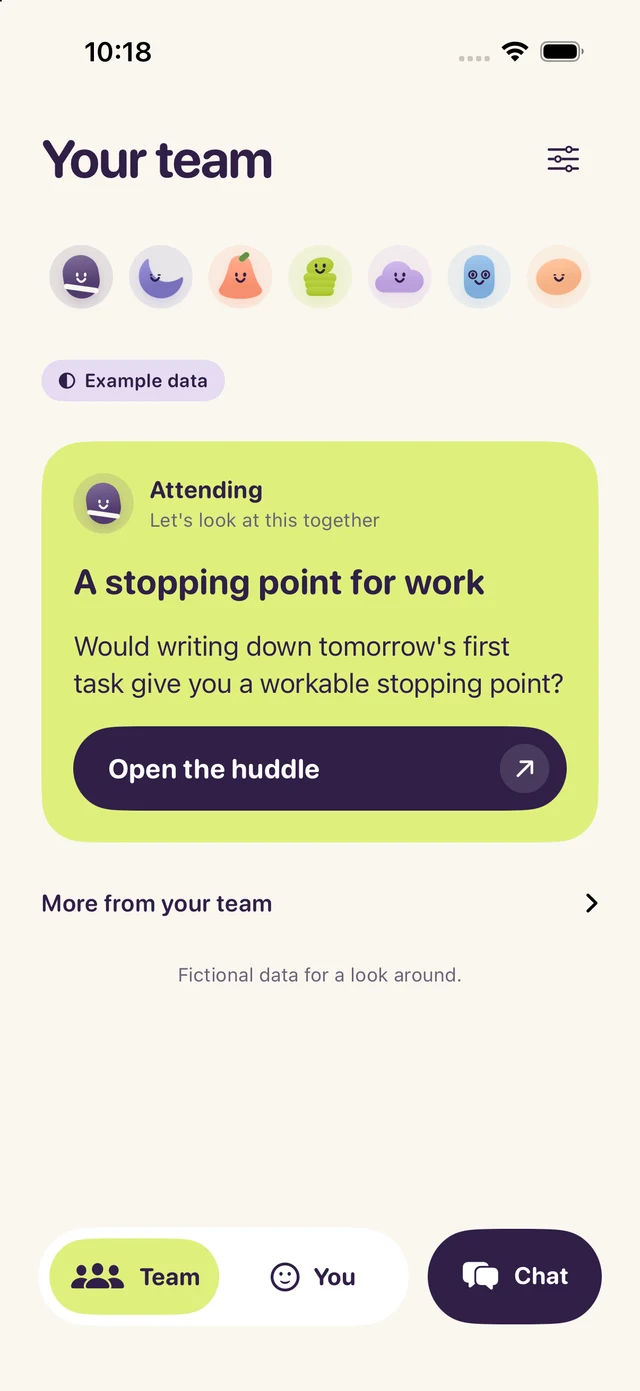
Stay healthy, improve fitness, manage weight or get more energy. Pick a starting point. You don't need to fill in your life story.
A busy week. A late dinner. A walk with a friend. Tell the team what the numbers can't.
See the team compare notes. Ask a question, adjust a suggestion, or leave it for another day.
A different focus for each teammate. One shared conversation, coordinated by the Attending.

Connects the useful points from the team, asks what fits your life, and helps you choose a next step.
Looks at shared sleep duration and your routines. Asks how you've been sleeping without pretending a wearable tells the whole story.
Helps you think through meals, timing and everyday eating habits from what you share. Meals aren't automatically imported.
Uses shared steps, workouts and how they felt to talk about movement that fits your day. A workout update can start a check-in.
Brings your mood, energy and life context into the conversation. Wellbeing support, not a therapist or crisis service.
Helps organize questions for a clinician or pharmacist. Does not import your medication list, prescribe, or change doses.
Considers shared activity and how you say you feel. Helps make room for rest without inventing a recovery score.
Sleep can raise a pattern. Mind can add what you shared about work. The Attending brings the useful points together.
Read their contributions, see the context behind them, or open Chat and talk to the whole team.
Request beta access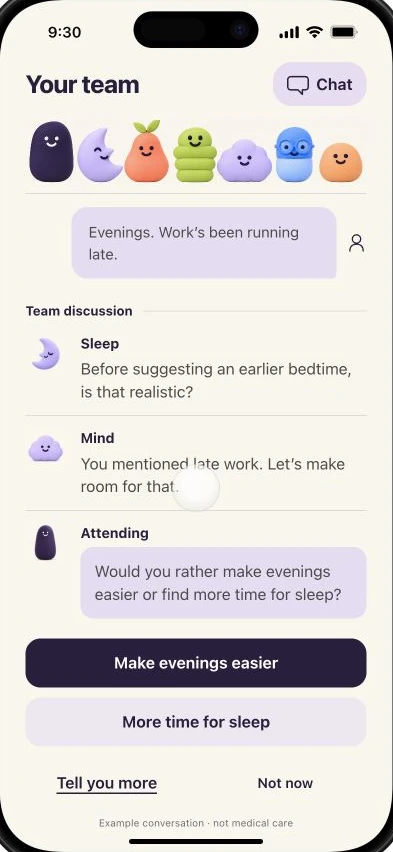
Apple Health gives your team a foundation. Check-ins, photos and your goals add the context behind the numbers. You choose what to share.

Read-only access across supported sleep, activity, heart, nutrition, body and other Health categories. The app shows which records it received. Missing readings stay unknown, not zero.
After you opt in, relevant context goes through Attending to Replicate and OpenAI. Photo and PDF review asks before sending, and you can correct the description before sharing it with your team.
With permission, Attending stores recent shared context for up to 30 days, and goals and active plans until removed. Local history is saved separately. Pause check-ins or delete cloud memory in Settings.
These are AI specialists, not human clinicians. Attending can make mistakes. It doesn't diagnose, treat, prescribe, or monitor emergencies. Your clinicians remain responsible for medical care.
The new pilot has three touchpoints: what matters this morning, an afternoon adjustment, and an evening follow-up. Default times are 8 a.m., 1 p.m. and 8 p.m.; you can change them. Prepared updates and remote notifications are being enabled after physical-iPhone checks pass.
Apple Health stores and displays your health information. Attending uses the readings you share alongside your own words to ask useful questions, compare perspectives and discuss something you might try.
Huddles are AI-generated, visible exchanges. Each contribution can consider the earlier replies and the available context. They aren't human consultations or a transcript of hidden AI reasoning.
No. Attending uses available Apple Health records from your iPhone and compatible devices or apps. Without shared records, the experience is limited to what you tell the team. Some comparisons need several days of data.
When a new supported workout reaches Attending through Apple Health, Movement can ask how it felt. Notifications are optional, and delivery depends on iOS and data availability. It isn't live health monitoring.
Attending is in private iPhone beta. Request access below. We haven't published subscription pricing, and this page does not take payment or start a subscription.
No. This version is focused on everyday wellbeing: understanding context, team conversations and next steps you choose. It doesn't book care or submit insurance claims.
Private iPhone beta
Request an invitation to try Attending on iPhone through TestFlight. Access is limited while we test and improve the app.
Opens your email app. Please don't include health information. A request is not an automatic invitation.